Automated Report Generation Engine
Cut quarterly report generation from 3 days of manual effort to 12 seconds of compute time. 200+ reports per quarter with zero errors, saving $180K in annual labor costs.
The Challenge
Every quarter, consultants faced the same grind: three full days copy-pasting data from databases into PowerPoint, hand-formatting charts, applying branding to each client deck. They'd wrangle 200+ test results across 8 product lines and 15+ factories per client, and still, formatting errors slipped through review. The best people were burning time on busy work instead of analysis, and every new report type took weeks to build from scratch.
The Impact
Three days of manual work became 12 seconds of compute time. 200+ reports per quarter, zero errors. Consultants stopped formatting and started analyzing, finding insights in the data that clients couldn't discover waiting for quarterly reports. New report types went from weeks of template engineering to hours of data mapping. The team saved roughly $180K annually on formatting, and their clients got better analysis because of it.
What We Built
An automated report engine that pulls data from multiple sources, normalizes it across different product types, and generates pixel-perfect branded PowerPoint decks, complete with dynamic charts, conditional sections, and multi-language support. Solar panel metrics look completely different from battery test data; the system handles all of it automatically. No human touches the formatting.
Technical Diagrams
Three schemas in, one deck out

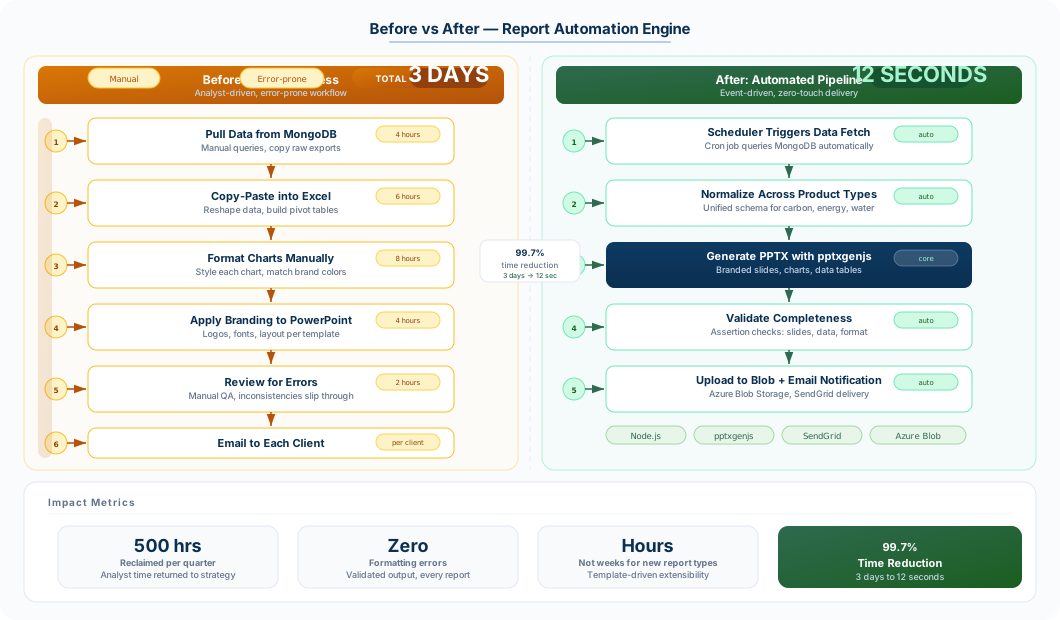
The same report, before and after
Background
The client’s consulting team produces quarterly performance reports for every active client relationship. Each report is a 30–50 slide PowerPoint deck that aggregates factory inspection data, compliance status, product test results, and trend analysis across a client’s entire manufacturing portfolio.
Before automation, a senior consultant would spend roughly three days per report cycle manually pulling data from MongoDB, formatting it into charts using Excel, and copy-pasting the results into branded PowerPoint templates. With 50+ active client accounts generating 200+ reports per quarter, the team was spending the equivalent of two full-time employees on formatting work alone.
The complexity came from data variability: a solar panel manufacturer’s quality metrics look nothing like an energy storage client’s battery test results. Each product line (crystalline silicon modules, thin-film panels, lithium-ion cells, inverters) has its own set of test parameters, thresholds, and reporting formats. A single client might have six factories producing three different product types, each with different data schemas.
Technical Approach
Data Normalization Pipeline
The core challenge was taming the variable data shapes. We built a normalization layer that maps each product category’s raw test data into a standardized intermediate format. This layer handles:
- Schema detection and validation per product type
- Unit conversion and threshold normalization across different testing standards (IEC 61215, IEC 61730, UL 1741)
- Temporal alignment of data collected at different frequencies across factories
- Missing data interpolation with clear flagging in the output
The normalizer runs as a series of composable transforms, making it straightforward to add new product categories without touching existing logic.
Report Template Engine
Rather than generating slides from static templates, we built a programmatic template system on top of pptxgenjs. Each slide type (title, data table, chart, comparison, summary) is a composable function that accepts structured data and produces formatted output.
Key capabilities:
- Conditional sections: slides are included or excluded based on data availability. If a client has no inverter test data, those slides simply don’t appear
- Dynamic charts: bar charts, line graphs, and scatter plots generated directly from normalized data with automatic axis scaling and labeling
- Client branding: color palettes, logos, and typography pulled from a client configuration file and applied consistently across all slides
- Multi-language support: report headers, labels, and boilerplate text are templated with i18n keys, supporting English, Mandarin, and German output from the same data
Orchestration
The generation pipeline runs on Azure Functions with a queue-based architecture. A scheduler triggers quarterly runs, but reports can also be generated on-demand through a lightweight internal web interface. Each report job:
- Fetches raw data from MongoDB and downstream REST APIs
- Runs the normalization pipeline
- Selects and populates slide templates
- Generates the PPTX binary
- Uploads to Azure Blob Storage and notifies the account manager via email
Failed jobs retry automatically with exponential backoff. A validation step compares the generated report against expected slide counts and data completeness thresholds before marking it as ready.
Results
The report engine transformed the consulting team’s quarterly workflow:
- Report generation dropped from 3 days of manual effort to 12 seconds of compute time per report
- 200+ reports generated per quarter with zero copy-paste or formatting errors
- Consultants reallocated roughly 500 hours per quarter from formatting to actual analysis, the work clients are paying for
- New product category report templates can be built and tested in hours instead of the weeks it took to manually create and validate a new PowerPoint format
- The estimated labor savings exceeded $180K annually, not counting the improved client satisfaction from error-free, consistent deliverables